Built for teams who care about customers
Multi-channel inbox, Gmail & Outlook email sync, Google Calendar integration, AI agents, ticket management, and billing, every feature designed to help your team respond faster and resolve more.
Every conversation. One inbox.
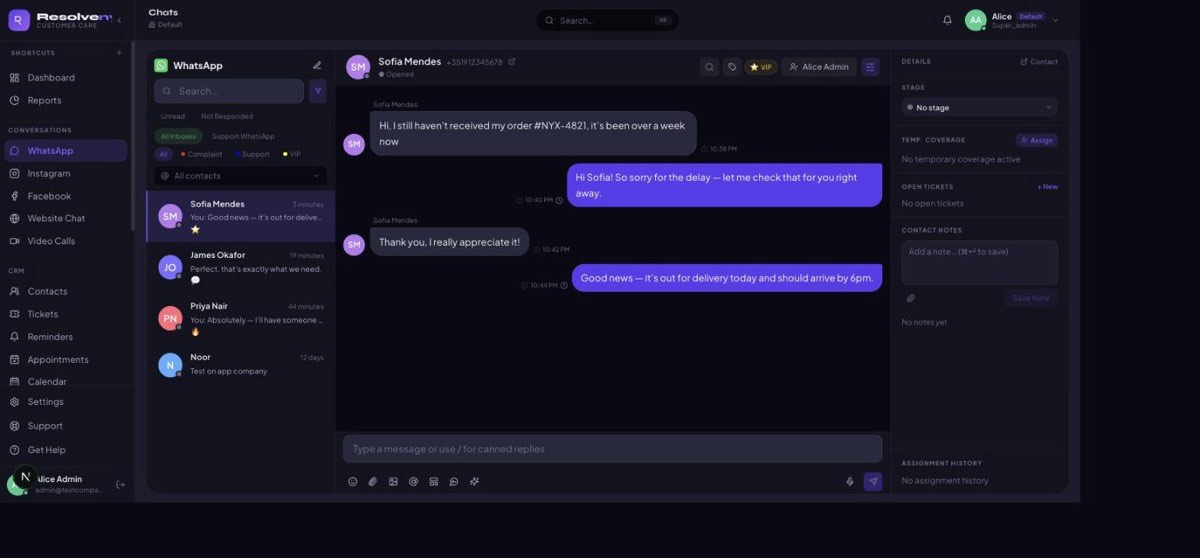
WhatsApp, Instagram, Facebook, Email, and Website Chat: all incoming messages land in a single shared inbox. No app switching, no missed messages.
Enterprise-grade connection via the official Meta WhatsApp Business API. Send, receive, and manage all conversations.
Connect your Instagram Business account and Facebook Page to handle all social DMs from the same inbox.
Sync any email account and reply to emails using the same interface as all other channels.
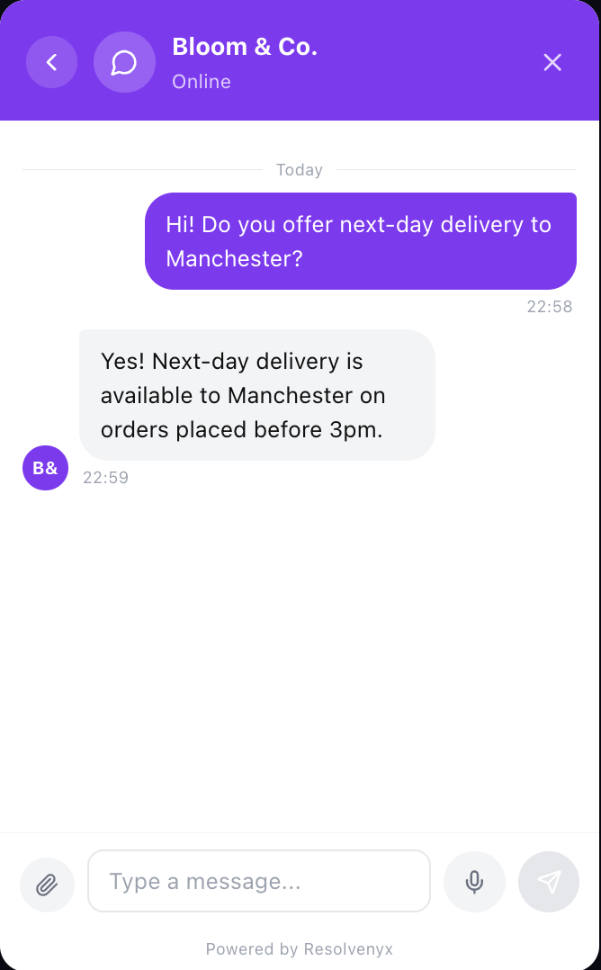
Embed a live chat on any website with one line of code. Visitor messages land alongside WhatsApp and email.
Typing indicators, read receipts, and live message delivery so your team always has the freshest context.
Filter by channel, status, assignee, label, or date in one click, across all your inboxes at once.
Gmail, Outlook, and any SMTP, fully synced.
Connect one or more email accounts and manage them right inside Resolvenyx. Send with a rich-text composer, reply in thread, and set a unique signature per account.
Connect Gmail using an App Password (required when 2-Factor Authentication is enabled). Step-by-step guidance is shown in the connect form.
Connect Outlook or any Microsoft 365 mailbox. Use an App Password if MFA is enabled on your account.
Connect any email provider by entering the SMTP host, port, IMAP host, and port. Works with G Suite, Fastmail, Zoho, and more.
Bold, italic, underline, links, bullet lists, alignment, and undo/redo: a full editor for every email you write.
Replies set the correct In-Reply-To and References headers so they group with the original thread in your recipient's email client.
Configure a unique HTML signature per connected account. The signature is automatically appended to every new outgoing email.
Incoming emails are fetched automatically every 5 minutes. New emails also arrive in real time via WebSocket while you have the app open.
Connect as many email accounts as you need. Use 'All inboxes' to see everything, or filter by account in the Email sidebar.
Your full schedule, inside Resolvenyx.
Sync Google Calendar, Outlook Calendar, or any iCal-compatible source. External events appear in the main Calendar view alongside your reminders and tickets, colour-coded by calendar.
Get the secret iCal URL from Google Calendar settings and paste it in. Events sync immediately and update every 30 minutes.
Publish your Outlook calendar as an ICS link and connect it to Resolvenyx. Any iCal-compatible calendar works the same way.
Each team member connects their own calendars independently. Your personal Google Calendar only affects your own view.
Calendars refresh automatically in the background. You can also trigger a manual sync any time from Settings → Connected Calendars.
Each connected calendar gets a colour you choose. Events appear as coloured dots on mobile and chips on desktop.
Click any day in the calendar grid to see a panel listing all reminders, tickets, and external events, with times, locations, and which calendar they're from.
Turn every issue into a trackable ticket.
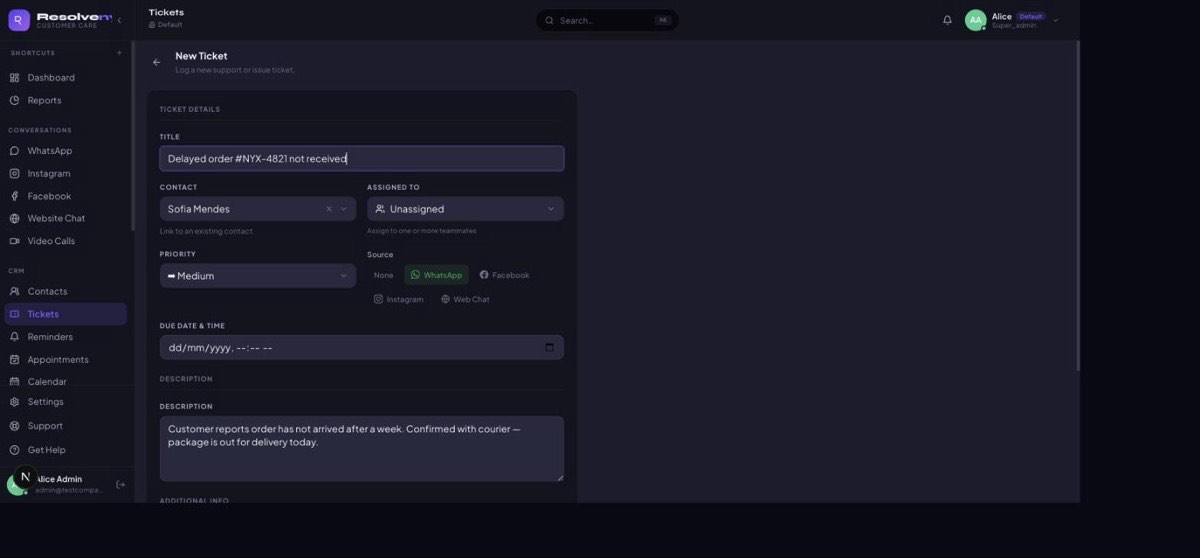
Convert any conversation into a structured support ticket. Set priorities, add internal notes, track SLAs, and close issues with confidence.
Create a ticket from any conversation without leaving the inbox.
Mark tickets as Low, Normal, High, or Urgent to focus on what matters most.
Leave private notes on tickets visible only to your team.
Set response and resolution SLAs by priority and get alerted before breaches.
Tickets with due dates appear on the Calendar page alongside reminders and external calendar events.
Every action (assignment, note, status change) is logged with timestamp.
AI agents that handle conversations automatically.
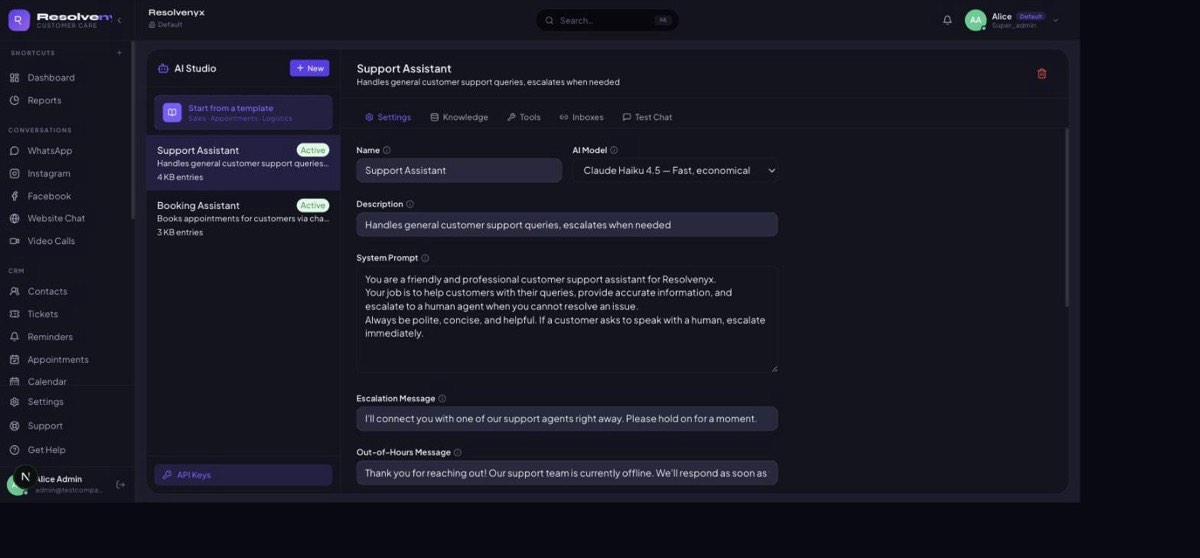
Build AI agents powered by Claude, ChatGPT, or Gemini. Give them a knowledge base, set escalation triggers, configure working hours, and attach them to any inbox.
Choose from Anthropic Claude, OpenAI GPT-4o, or Google Gemini for each agent. Bring your own API key to remove quota limits.
Add articles, FAQs, and product info that the agent draws on when answering. Add photos to entries for visual context.
Define keywords or conditions that trigger an instant handoff to a human agent with a configurable escalation message.
Set the hours the agent is active. Outside those hours, customers receive an out-of-hours message and are queued for human agents.
Use the built-in test chat panel to see exactly how the agent responds before attaching it to a live inbox.
Attach one agent to one or more inboxes. The agent automatically handles all new conversations on those inboxes.
Full billing control, right inside the app.
Upgrade or downgrade your plan instantly, no support ticket required. Manage payment methods, add multiple billing email addresses, and track every invoice in one place.
Upgrade from Starter to Growth to Business to Enterprise in one click — new quotas (users, inboxes, contacts, storage, AI tokens) apply immediately. Downgrades take effect at the end of your billing period.
Need more than your plan includes? Add extra users, inboxes, or contacts on top of your plan’s quota, billed monthly alongside your subscription.
Add as many billing email addresses as you need: your finance team, technical admin, and accountant can all get invoice copies.
Invoices are auto-generated on the 1st of each month. Pay any open invoice instantly with a saved card via Stripe.
See your current plan, monthly AI token usage, storage used, and user count at a glance in the Billing tab.
Starter (£39/mo), Growth (£79/mo), Business (£149/mo), and Enterprise (£299/mo), each with clearly defined user, inbox, contact, storage, and AI quotas.
The Billing tab is visible only to admins, keeping sensitive payment information away from agents and staff.
Right conversation, right agent, right now.
Stop conversations from falling through the cracks. Route, assign, and balance support work across your team, across every channel.
Assign any conversation to a specific agent with one click from the inbox.
Set rules to automatically route messages based on keywords, tags, or time of day.
See each agent's active conversation count and distribute new work evenly.
Create team-level inboxes (Sales, Support, Billing) for organized routing.
Agents get notified instantly when a conversation is assigned to them.
A dedicated view of all unassigned conversations so nothing gets missed.
Never forget a follow-up again.
Set reminders directly on conversations, view everything in a monthly calendar, and sync your Google or Outlook calendar for a complete picture of your day.
Set a reminder on any conversation to resurface it at exactly the right time.
See all reminders, ticket due dates, and synced external events in one grid.
Connect Google Calendar or Outlook Calendar via iCal URL. Events appear colour-coded alongside your reminders.
Create reminders visible to the whole team, ideal for handovers and coverage.
Get notified when a reminder is past due.
Create reminders and tickets directly from the Calendar page by clicking any day.
Reach your entire audience with one send.
Send personalised WhatsApp broadcast messages to any segment of your contacts using Meta-approved templates. Schedule ahead, track delivery in real time, and let the stop list handle opt-outs automatically.
Use your pre-approved WhatsApp message templates to broadcast to hundreds or thousands of contacts in one campaign.
Select recipients by label, source, or manual list, and send the right message to the right segment every time.
Pick a future date and time for your campaign and let Resolvenyx handle the sending while you focus on other work.
See sent, delivered, read, and failed counts for every campaign in real time as WhatsApp reports back.
Contacts who reply STOP are automatically added to the Stop List and excluded from future campaigns. No manual work required.
Full history of every campaign: who was targeted, what was sent, when it ran, and how it performed.
Automate repetitive work, without code.
Build automation rules that trigger on new tickets, incoming messages, assignment changes, or status updates. Let Resolvenyx handle the routing, tagging, and notifications automatically.
Choose a trigger event (new ticket, message received, status changed) and chain as many actions as you need. No developer required.
Automatically assign incoming conversations to specific agents or teams based on keywords, channel, or time of day.
Apply labels and tags automatically so conversations are categorised the moment they arrive.
Send internal team notifications or Slack messages when a high-priority ticket is created or SLA is breached.
Automatically escalate tickets past SLA or move them to a specific stage after a set time without a response.
Enable or disable any workflow instantly. All activity is logged in the audit trail.
Built-in privacy compliance, out of the box.
Resolvenyx ships with the tools your legal team needs: consent capture, data subject request tracking, one-click export and erasure, configurable retention schedules, and a full privacy audit trail.
A privacy notice and opt-in checkbox appear in your website chat widget before any conversation starts, compliant with GDPR Article 13.
Log and manage data access, correction, portability, and erasure requests from a dedicated GDPR panel with status tracking and deadlines.
Export a contact's complete data (conversations, tickets, reminders, and profile) as a downloadable JSON/CSV package in seconds.
Permanently erase a contact's personal data on demand. All linked conversations, tickets, and files are scrubbed and logged for compliance.
Configure how long different data types are kept. A nightly retention job automatically purges data that has passed its retention period.
Every data access, export, and erasure is logged with the acting user, timestamp, and reason, ready for regulator inspection.
Your team's own space, inside Resolvenyx.
A dedicated real-time chat for your support team, completely separate from customer conversations. Coordinate handoffs, share context, and keep everyone aligned without leaving the platform.
Create chat channels for teams, projects, or topics. Messages are only visible to your internal team, never to customers.
Tag a specific team member to get their attention on a message or hand off a customer conversation with full context.
Share screenshots, documents, and files with your team directly in the chat. No need to jump to email or Slack.
Messages arrive instantly via WebSocket. Read receipts and online status let you know who is available.
Internal chat works on any device. Stay in the loop whether you are at your desk or on the move.
Full message history is searchable so you can find past decisions, shared files, or context at any time.
Speak your customer's language, automatically.
Resolvenyx detects the language of every incoming message and enables your team and AI agents to respond in kind. Serve customers across the world without hiring multilingual agents for every language.
Every incoming message is analysed and its language identified instantly. No manual tagging or setup required.
When an AI agent is handling the conversation, it replies in the detected language automatically using the same knowledge base.
Human agents see a real-time translation of any message alongside the original so they always understand the customer, regardless of language.
Set routing rules to direct messages in a specific language to the team or agent best equipped to handle them.
Save quick reply templates in multiple languages. The right version is suggested automatically based on the conversation language.
Language detection and translation work across WhatsApp, email, website chat, Instagram, and Facebook DMs.
Let customers book appointments in a WhatsApp conversation.
A purpose-built AI booking agent handles appointment scheduling end-to-end: checking availability, confirming the slot, sending reminders, and processing changes, all inside a natural chat conversation.
The booking agent checks your connected calendar in real time and offers the customer available slots that match their requested time or preference.
Customers can book a new appointment, move an existing one, or cancel entirely, all by replying to a WhatsApp message. No form, no app, no friction.
Booking confirmations are sent instantly to the customer via WhatsApp with the date, time, location, and any relevant instructions.
Reminder messages are sent automatically at configurable intervals (e.g. 24 hours and 1 hour before) to reduce no-shows.
When a customer has a non-standard request the agent cannot resolve, it escalates to a human agent with the full booking context attached.
All confirmed bookings are written back to your connected calendar so your team's availability stays accurate in real time.
Live chat on your website, in the same inbox.
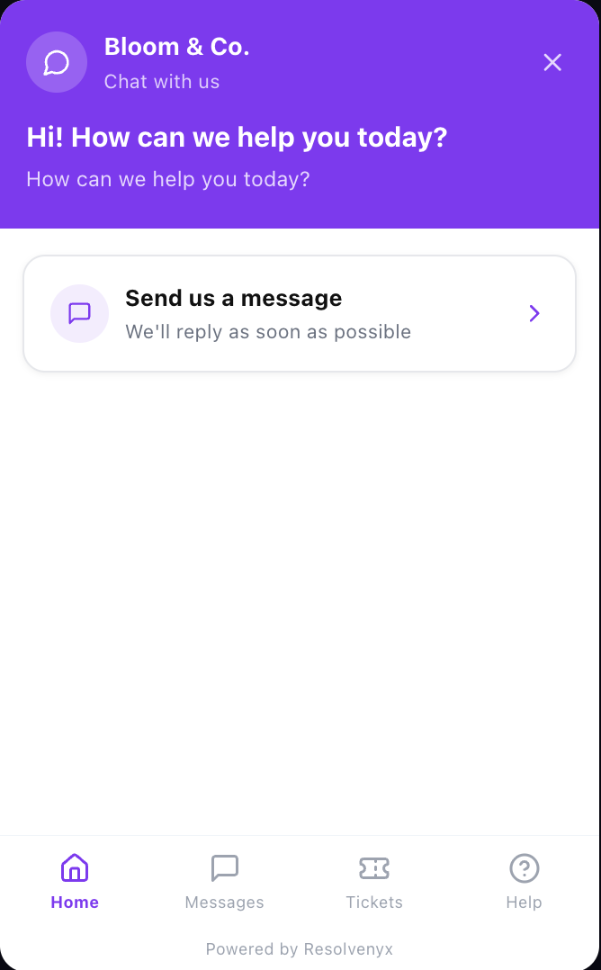
Embed a live chat widget on any website with a single line of code. Visitor messages arrive right alongside your WhatsApp, email, and social conversations: one inbox for everything.
Paste a single script tag into your site and the widget goes live instantly. No developer required beyond that.
Website chats, WhatsApp messages, and emails all land in the same Resolvenyx inbox. One view, every channel.
Typing indicators and read receipts keep conversations feeling live and responsive for your visitors.
Automatically identify logged-in users, or capture a visitor's name and email before the chat begins.
Set your brand colors, logo, avatar, and welcome message to make the widget feel native to your site.
When no agents are online, visitors can leave a message that lands in your inbox as a ticket. No lead lost.
<!-- Paste before </body> on any page -->
<script
src="https://cdn.resolvenyx.com/widget.js"
data-workspace-id="YOUR_WORKSPACE_ID"
></script>
Reply faster, every time.
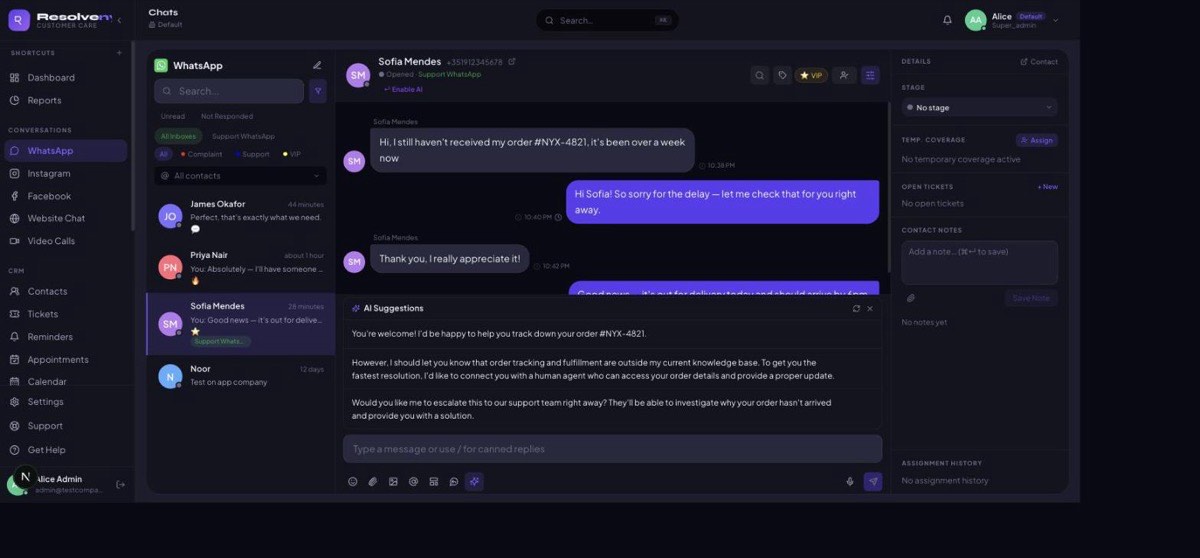
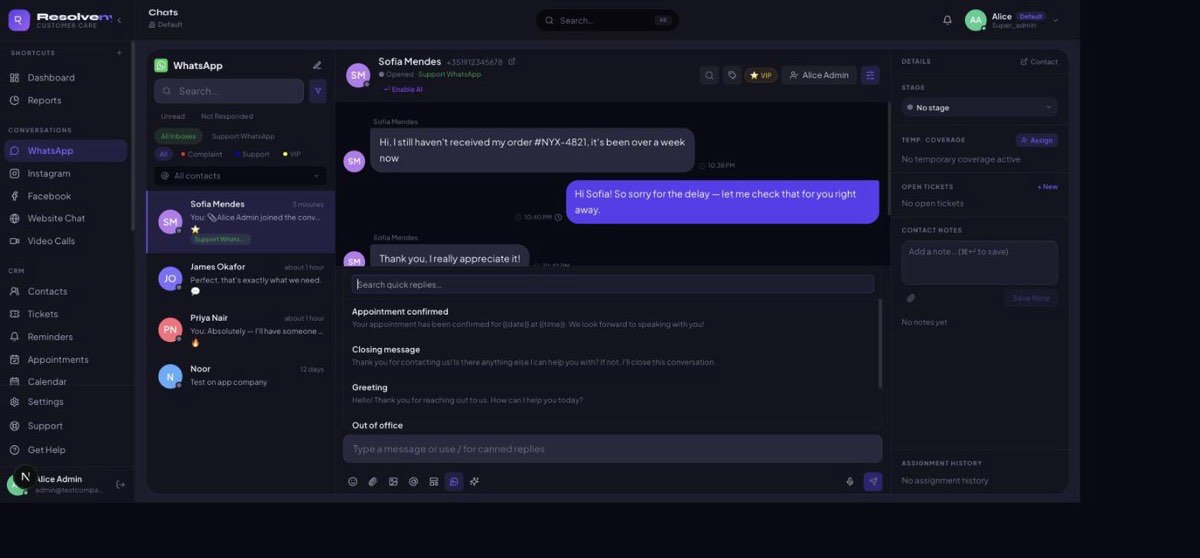
Save your team's most-used responses as one-click templates, and let AI Copilot draft ready-to-send suggestions based on the live conversation, so every reply goes out faster, without sounding robotic.
Store your most common responses (greetings, order updates, appointment confirmations) and insert them into any conversation in one click.
Templates support variables like {{date}} and {{time}} so saved replies still feel personal to each customer.
Generate ready-to-send reply options based on the live conversation. Agents pick one, edit it, or send as-is.
Attach any AI Studio agent to an inbox as a Copilot, so suggestions match your brand voice and specific expertise.
Quick replies and AI suggestions both drop straight into the compose box. No copy-pasting between tools.
Search your team's full quick-reply library by title mid-conversation, so the right saved response is always a keystroke away.
See it all in one platform
Start your 7-day free trial and explore every feature with your team.
Get started free